

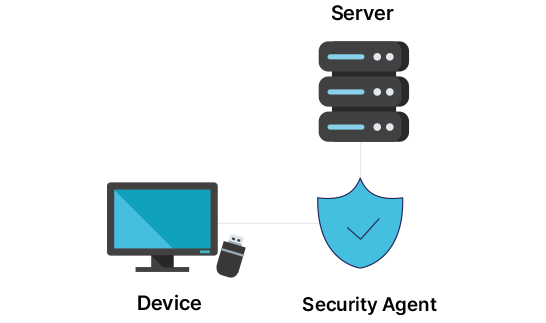
When visitors bring in laptops, a security agent is installed to block file copying and transmission through external storage devices and communication channels. This solution helps prevent information leakage by generating and transmitting logs of file activity on the internal disk, including file creation, renaming, deletion, restoration, and Recycle Bin deletion. It can also delete newly created files when the laptop is taken out.
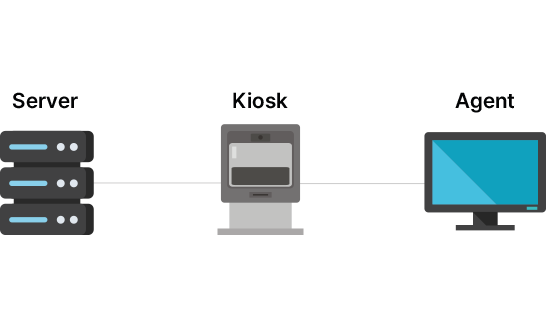
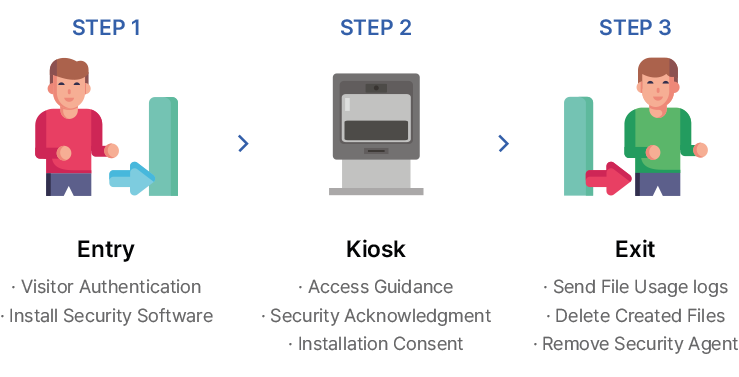


 Blocks leakage paths through storage devices and communication channelsMakes tracking and auditing easier through file activity logsMinimizes leakage risk by deleting generated files upon exportBlocks unauthorized communication such as wireless LAN and tetheringSupports procedural verification through electronic signatures and pledgesProvides integrated management of check-in/check-out, policies, and logsApplies file system filter driver technologyShortens exit time through file event-based processingStrong self-protection for the security agent
This system checks incoming laptops and portable storage devices such as USB drives and external HDDs for Windows patch status and virus infection. It helps prevent infection of internal networks or equipment and reduces security threats such as hacking.
 Fast verification of security requirements within 1 minuteSupports simultaneous inspection of PCs and storage mediaCollects antivirus status and update informationQuarantines infected files and provides inspection reportsOperates a detailed inspection process when requirements are not metCan be integrated with visitor and access control systems
When company laptops are taken outside the premises, they can be managed through physical inspection at checkpoints and by applying security policies based on approved or unauthorized export detected by security agents. This solution helps manage unauthorized removal and prevents information asset leakage in cases such as disk separation, theft, or loss after the laptop leaves the site.

This system completely deletes files stored on IT equipment such as laptops and portable storage devices so that they cannot be recovered.
 Format-based deletionData deletionDoD 5220.22-M (8-306.E, C and E) 7-pass applied by default
Enter your name and email address, then verify the authentication code to download the catalog.

